Auto Scroll on Instagram Reels changes video watching for everyone. This feature removes the need for constant screen swiping. Videos now play continuously without manual effort.
Instagram created this update for better comfort. Long viewing sessions feel smoother and uninterrupted. Users can enjoy content while multitasking easily. This guide explains everything using very simple English. All details are explained clearly for global users.
Auto Scroll on Instagram Reels Meaning And Purpose
Understanding Auto Scroll on Instagram Reels
Auto Scroll on Instagram Reels is a playback setting. This setting allows Reels to play automatically. When one video ends, another begins instantly. Users no longer swipe between videos manually.
The experience feels smooth and continuous. Hands free watching becomes very easy. This feature supports passive content consumption. Instagram designed it for longer viewing sessions. Auto Scroll on Instagram Reels reduces interruptions during playback. Manual swiping often breaks viewing flow.
This feature removes those small breaks. Users stay engaged without touching screens. Watching Reels feels more immersive now. The transition between videos feels natural. Instagram wants users to enjoy content comfortably.
Why Instagram Introduced Auto Scroll
Instagram wants watching Reels to feel effortless. Manual scrolling becomes tiring during long sessions.
Auto Scroll removes repeated hand movements. The platform follows modern content consumption trends. Short videos encourage continuous watching habits. Other apps already support similar playback styles. Instagram wants to stay competitive globally.
User comfort remains an important goal. This feature benefits casual and heavy users. Multitasking users find it especially useful. People can watch Reels without focusing fully. Instagram studies user behavior carefully. This update matches how people watch videos today.
Auto Scroll on Instagram Reels How To Enable
Enabling Auto Scroll Inside Instagram App
Auto Scroll on Instagram Reels activates easily. Users must open the Instagram mobile application. Reels must be viewed in full screen.
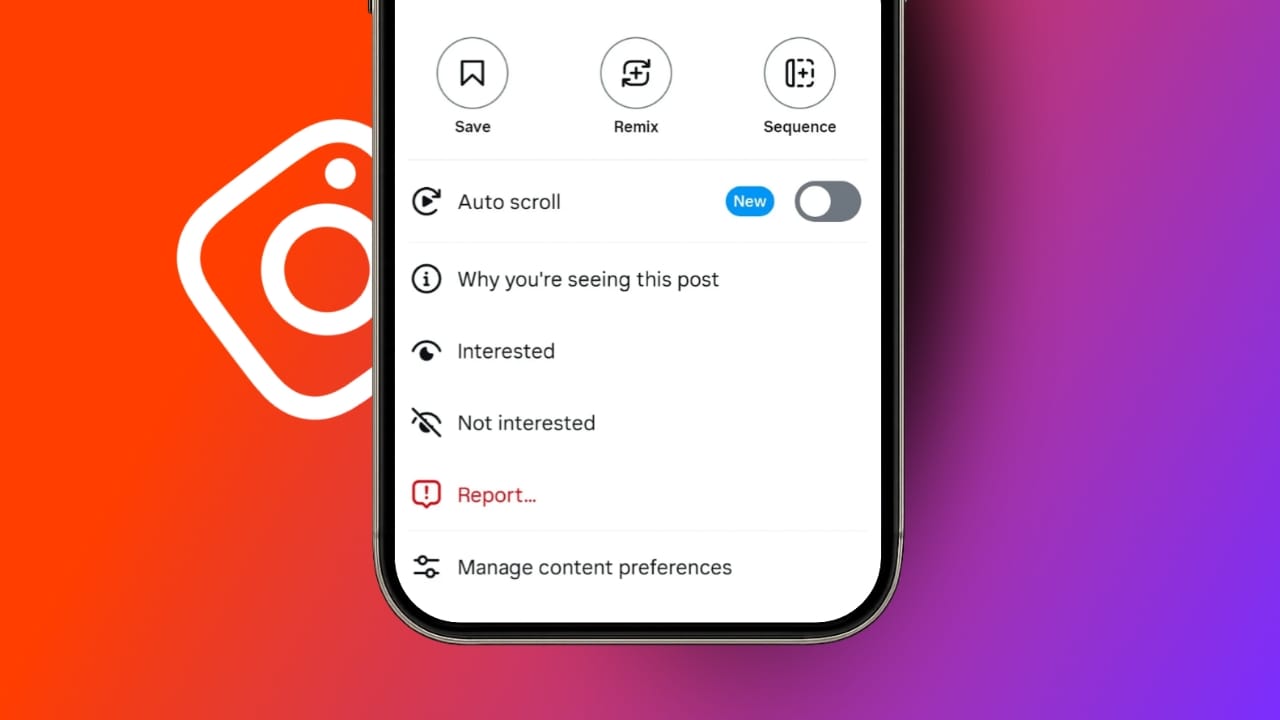
The option does not appear otherwise. A three dot menu appears on the Reel. Tapping this menu reveals playback options. Auto Scroll appears as a toggle option. Turning it on activates continuous playback. Once enabled, Reels scroll automatically.
Videos play one after another smoothly. No swiping is required anymore. The feature works immediately after activation. Users can disable Auto Scroll anytime. The same steps apply for disabling. Instagram gives full control to users.
Important Notes About Activation
Auto Scroll only works on mobile apps. Instagram Web does not support it currently. The application must be updated. Older versions may hide the option. Restarting the app sometimes helps.
Logging out and logging back refreshes features. Different accounts may show different options. Instagram releases features gradually. Server side rollouts control availability. There is usually nothing wrong.Waiting is sometimes required.
Auto Scroll on Instagram Reels Availability And Devices
Mobile Device Availability
Auto Scroll on Instagram Reels focuses on mobile users. The feature is rolling out gradually worldwide. Not all users see it immediately. Availability depends on region and account. Instagram controls access through server updates.
iPhone users currently see early access.Testing continues on Apple devices. Android users will receive it soon..Instagram confirmed wider Android rollout. Both platforms will support the feature fully.
Instagram Web And Desktop Experience
Auto Scroll does not work on Instagram Web. Desktop users must scroll manually. Instagram has not announced desktop support. The feature is designed for mobile experience. Short videos perform best on phones.
Using Auto Scroll on Mac Computers
Mac users still have an option. They can use the iPhone Mirroring application. Auto Scroll must be enabled on iPhone first. Mirroring carries settings automatically. Instagram opens through a mirrored phone screen.
Reels behave exactly like phone usage. Videos scroll automatically without swiping. This method uses official Instagram functionality. Mac users can enjoy Auto Scroll this way.
Auto Scroll on Instagram Reels Troubleshooting
When Auto Scroll Option Is Missing
Some users cannot see Auto Scroll. This does not indicate any account issue. Instagram releases features slowly. Server side updates decide availability. Updating the Instagram app often helps. Full screen Reels viewing is required.
Logging out refreshes account features. Restarting the app can help. Checking another account may show differences. Patience is sometimes the only solution. Instagram enables features gradually. Users must wait until rollout completes.
Auto Scroll on Instagram Reels User Experience Impact
Positive Effects Of Auto Scroll
Auto Scroll makes watching Reels comfortable. It removes repeated screen touching. Users enjoy smooth transitions. Viewing feels more immersive and relaxed.
Multitasking becomes easier than before. Long viewing sessions feel less tiring. Content discovery becomes effortless. Users stay engaged longer. The experience feels modern and fluid.
Possible Downsides Of Auto Scroll
Auto Scroll reduces manual control slightly.Users may lose track of time. Binge watching becomes easier. Some users prefer manual scrolling. Instagram allows disabling Auto Scroll anytime. Users choose their preferred style.Both viewing methods remain available.
Additional Instagram Features Being Introduced
New 3:4 Vertical Photo Format
Instagram now supports a 3:4 photo format. Earlier formats included square and vertical. The new format suits modern smartphone cameras. Photos appear taller and more immersive.
This format works for single photos. Carousel posts also support it. Creators gain more screen space. Visual storytelling improves greatly.
Other Features Currently Under Testing
Instagram is testing several new tools. AI powered editing tools are coming. These tools help quick photo edits. Video adjustments become easier. Smarter search functions are being tested.
Users can find content faster. Personalized feed controls are also coming. Feeds will feel more tailored. These updates keep Instagram competitive. Meta focuses on long term engagement. User experience remains the main priority.
The Bottom Corner
Auto Scroll on Instagram Reels improves watching comfort greatly. It removes the need for constant swiping. Users enjoy hands free continuous playback. The feature supports multitasking and longer sessions.
Availability depends on gradual rollout stages. Instagram also adds creative new tools. Photo formats and AI features improve content creation. Overall Instagram becomes smoother and more engaging.