- Instagram Map location sharing is off by default and only works if you opt in.
- To stop sharing, open Map from your DM inbox, tap the gear icon, choose No one and tap Update.
- For more privacy, block Instagram's location access in your iPhone or Android settings.
To turn off location sharing on Instagram, open your DM inbox, tap Map at the top, tap the settings (gear) icon, choose No one and tap Update. Instagram Map location sharing is off by default, so you only need to do this if you turned it on earlier. For extra privacy, you can also block Instagram’s location access in your phone settings.
What Is Instagram Map?
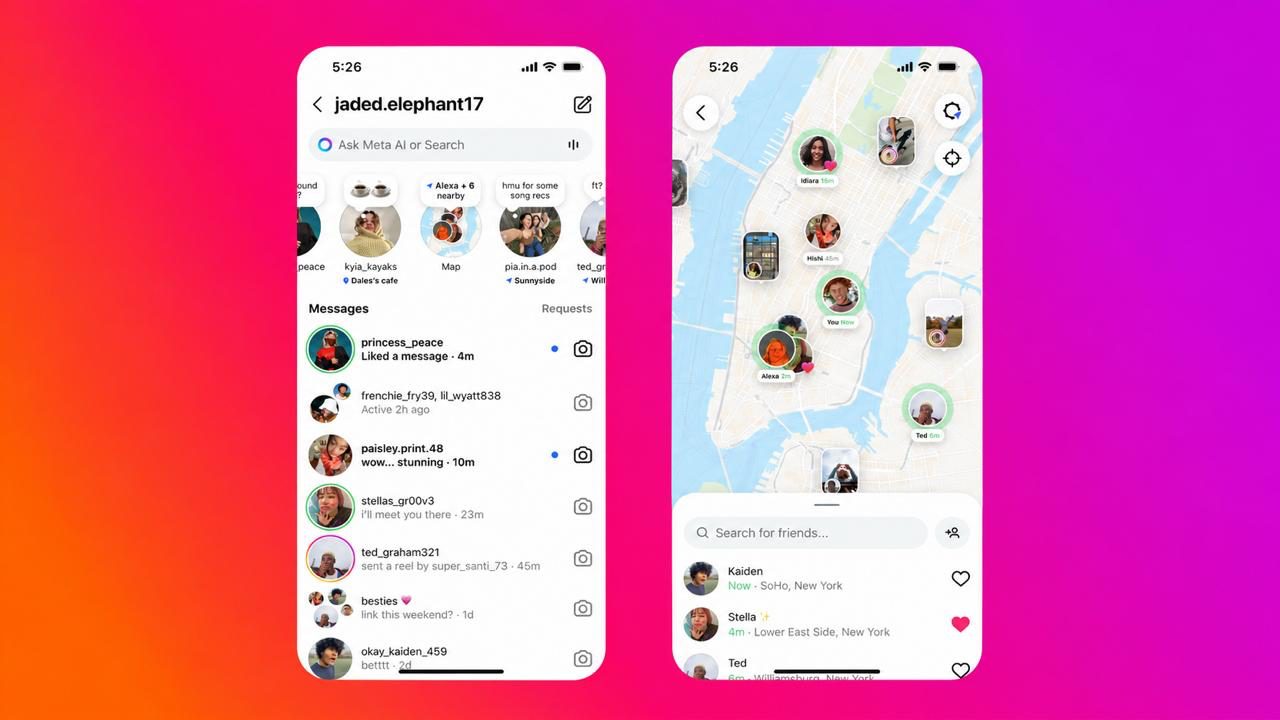
Instagram Map is a feature inside the DM inbox that shows location-tagged posts, Reels and stories from friends and creators. It also lets you share your last active location with people you choose. Meta first launched it in the US in August 2025 and rolled it out in India in October 2025.
- Off by default: your location is only shared if you opt in.
- Last active location: when sharing is on, your location updates when you open Instagram or return to it from the background. It is not a constant live feed.
- Tagged content: any post, Reel or story with a location tag can appear on the map, even if location sharing is off.
- Clear indicator: the top of the map shows whether you are sharing your location or have device location turned off.
How to Turn Off Location Sharing on Instagram Map
The Map feature is only available in the Instagram mobile app. Update the app first so the options match the steps below.
- Open Instagram and tap the Messages (paper plane) icon to go to your DM inbox.
- Tap Map at the top of the inbox.
- Tap the settings (gear) icon in the top-right corner of the map.
- Under location sharing, select No one.
- Tap Update to save the change.
After this, your location is no longer shared with anyone on the map. Menu names may look slightly different depending on your app version.
Choose Who Can See Your Location
If you want to keep sharing with a few people, Instagram lets you pick a smaller audience instead of turning it off completely:
- Friends: followers you follow back.
- Close Friends: only people on your Close Friends list. See how to create a Close Friends list on Instagram.
- Only selected friends: specific people you pick.
- No one: stop sharing your location.
You can also exclude specific people or places, such as your home, so your location is not shown when you are there.
Turn Off Instagram Location Access on Your Phone
Instagram settings control what you share in the app. Your phone controls whether Instagram can read your location at all. Turning this off adds another layer of privacy. To switch off location for every app on your phone, see how to turn off location on Android.
On iPhone
- Open Settings.
- Scroll down and tap Instagram (in newer iOS versions, go to Apps > Instagram).
- Tap Location.
- Choose Never.
On Android
- Open Settings.
- Tap Apps and select Instagram.
- Tap Permissions > Location.
- Choose Don’t allow.
Menu names can vary by phone brand. Blocking location access may limit features such as adding location tags. To control other sensors on your phone, read how to disable Android phone sensors.
Location Tags vs Location Sharing
These are two different things. A location tag is a place you add to a post, Reel or story, and it can appear on the map for people who can see that content. Location sharing shows your last active location to the people you choose. Turning off location sharing does not remove tags from old posts, so edit or remove those tags separately if needed.
Why You Should Review Your Location Settings
Sharing your location can make meeting friends easier, but it can also reveal your daily routine, such as where you live, work or study. Someone who sees this regularly could learn more about you than you intend. Limiting sharing reduces the risk of stalking and unwanted attention.
Safety Tips for Teenagers and Parents
Teen accounts can be more at risk if they share their location widely. With Instagram’s parental supervision, parents can control whether a supervised teen can use map location sharing and see who the teen shares with. Parents also get a notification when their teen starts sharing, which is a good moment to talk about safe sharing.
Other Privacy Settings to Check
- Messages: control who can send you message requests.
- Tags and mentions: limit who can tag or mention you.
- Followers: remove accounts you do not recognise, especially on a public profile.
- Old posts: hide Instagram photos without deleting them using Archive.
- Other apps: Snapchat has a similar map; see how to turn off location sharing on Snapchat.
Frequently Asked Questions
Is Instagram location sharing on by default?
No. Meta says location sharing on the Instagram Map is off unless you choose to turn it on.
Does Instagram share my live location all the time?
No. When sharing is on, Instagram shows your last active location, which updates when you open the app or return to it from the background.
Can people still see where I posted from after turning off sharing?
Yes, if you added a location tag to a post, Reel or story. Remove the tag from that content to hide it from the map.
Is Instagram Map available in India?
Yes. Meta announced the rollout of Instagram Map in India in October 2025.
Final Takeaway
Instagram Map location sharing is off by default, but it is worth checking. Open Map from your DM inbox, set sharing to No one, and turn off location access in your phone settings if you want full control.